
Zoom out and find your bearings.
A spatial canvas for your files and media — where everything has a place, where you and your AI work from the same view.
Computing got visual. Then it stopped.
In the beginning was the command line.1 Computing started out textual and conversational: you typed something, the machine typed back. Turn-taking.
Over the next half-century, computing grew steadily more visual. Command lines gave way to graphical interfaces — the mouse, the window, the desktop. Then the web; then the iPhone. Then social feeds that even an infant can navigate; then VR. Each step toward something more visual, more interactive, more direct — the 1980s even coined a term for the idea: direct manipulation. You don’t tell the system what you want; you do it, by acting on the thing itself.
And then AI arrived, and the industry reversed course. The most consequential new interfaces are textual and conversational again. It’s telling that Claude Code — a tool that changed how software gets written — shipped as a literal command-line tool: half a century of evolution toward the visual, and today’s frontier is once again a terminal with a blinking cursor.
But the conversational interface isn’t an endpoint. Seeing and conversing are different modes, and human spatial perception is not something AI obsoletes. Nobody is going to replace their iPhone with a voice assistant, however good the assistant gets — not because the technology isn’t ready, but because seeing things is one of the things people do best, often better than reading, describing, or remembering names.
So the next interface won’t choose between them — it will be both at once. That’s what Mesa is. The visual context is the AI context; what you’re looking at is what the agent sees. Ask about a document in front of you and the agent already has it; point at something and tell it what to do with it — summarize it, research it, rearrange by importance. It’s what you’re reaching for when you drag files into ChatGPT, Claude, or NotebookLM — except in Mesa the files are already in their place. And the agent, in turn, does what you can’t do by hand: curating and arranging at a scale a person can’t match, or creating a visual arrangement of new information specifically designed for what you’re now doing. There is more information to manage per person than ever, with less structure than ever, in part because AI is now generating it. What’s missing is the shared place where you and an agent can both see what you have and act on it together.
The visual and the conversational aren’t rivals. The next interface needs both — a space you can see, and an agent you can talk to.
Files have lost their place.
An interface, in the end, is how you work with data — and files are the oldest, most common, and most stubborn way we store it. Which makes it strange that this is the corner of computing that has barely budged.
How we keep files hasn’t really changed since 1984. Folders contain files. Files have names. You navigate by clicking through a hierarchy, reading names, and hoping you remember what’s inside. The structure holds your stuff, but it loses your thinking. The most ordinary task in computing — keeping things and finding them again — has stood still while everything around it was reinvented several times over.
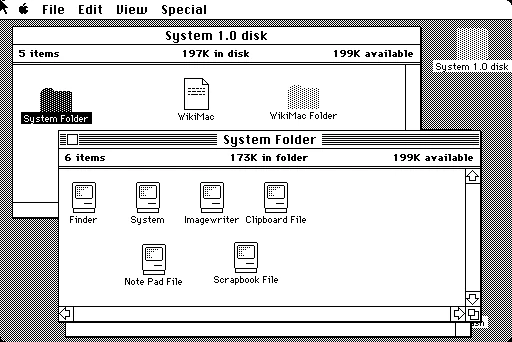
And the problem has quietly gotten worse. Most of us now keep things across four or five cloud services that don’t know about each other. We make far more than we used to — drafts, photos, screenshots, AI-generated images, voice memos, PDFs, bookmarks. The names get less helpful as the volume climbs; the folders get less meaningful as everything scatters across them. At some point a lot of us just give up — no organization at all, leaning on an ever-less-effective search to turn up the one thing we’re after.
I built Mesa because the difficulty of simply seeing my own work had stopped feeling like a personal annoyance and started feeling like a real gap — between how much we now keep and how little the tools for keeping it have changed. It’s an attempt to advance the visual, spatial side of computing — to give information a place again, and to do it in the age of AI, with an AI agent as a first-class participant in a visual environment rather than the replacement for one.
The canvas
Mesa is a spatial canvas for information — for anything you can see and interact with: media, widgets, notes, bookmarks. Files appear as themselves — thumbnails, previews, contents — at whatever level of detail the current zoom affords. You navigate by zooming. Position carries meaning: what’s next to what, what’s grouped with what, what you’ve put first.
You don’t open a file in a new tab, or in a separate application. It opens where it lives, at the spot you found it. A PDF renders inline, page by page. A text file can be edited on the spot. A video plays in place. An audio file shows its waveform. Click outside and the canvas comes back. Mesa keeps you oriented by erasing the line between the icon you see and the actual opened file — they’re the same thing.
The frame
Folders are replaced by frames: bounded, named regions you can nest, color, and arrange. Like a folder, a frame holds files and other frames; unlike a folder, the things inside it can be ordered, positioned, and annotated — so a frame keeps the thinking a folder throws away.
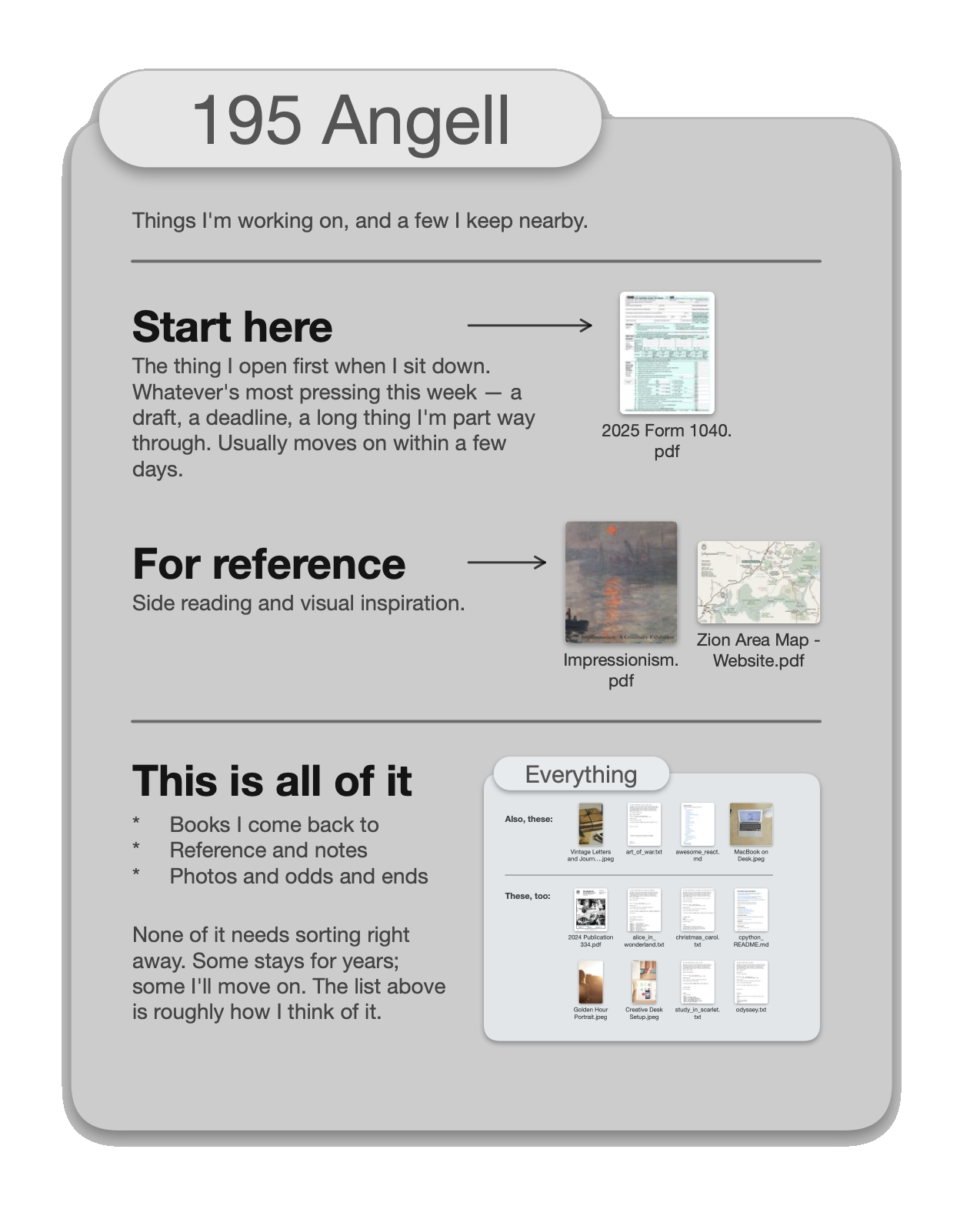
You can connect Mesa to your Google Drive, and it turns your folder hierarchy into a navigable, zoomable space you can take in at a glance. You can also upload directly from your computer or your phone. Nothing moves from where it lives. Mesa is just where you — and your AI agent — arrange and work with it.
The AI agent
You can ask Mesa’s built-in AI agent to find, summarize, and rearrange your content — or to research a topic and bring in new material from the web.
Here’s one example: ask it to reorganize a frame by file type, and it rebuilds the whole layout — sorting more than a thousand items into a fresh subframe for each type. A single undo puts the frame back exactly as it was.
The canvas you and your agent share isn’t only for files. It can hold anything you can see and interact with, just the same — a live data widget, a small game, a terminal session — placed where you put it, beside everything else.
Try it
This is a live demo, not a video.
No account. Nothing saved. Pan, zoom, click into files. Works on touch and trackpad — opens in a new tab.
This demo is the canvas itself — fully interactive, with a set of sample files to roam. The agent isn’t part of it; that runs in the account version, which I’m sharing selectively for now. You can see the agent at work in the videos here, or email me if you’d like to try it with your own files.
Product principles
Zoom is the primary verb. Open a file: zoom. See the overview: zoom out. Move between frames: zoom. Commit to that as the central gesture and the rest of the interaction model falls out of it.
Place carries meaning. Where you put something is a form of organization. Mesa treats spatial arrangement as a first-class property — what’s near what, what’s grouped, what sits at the top of a frame.
The thumbnail is the thing itself. Ordinary computing splits files from the applications that open them; you launch one to deal with the other. Mesa doesn’t — the thumbnail you see is the thing itself, rendered and alive, and it opens right where it sits: no modal, no new tab, no split pane. And the “file” needn’t be a file at all; the same surface hosts a widget, a game, or a terminal.
The AI sees what you see. The agent shares your view of the canvas. What’s on screen is its context; it can look at and act on the surface exactly as you do — no uploading, no describing, no separate “AI mode.” You and the agent are working on the same thing, at the same time.
Everything is reversible. Any change, from any source, at any scale, can be undone. It’s what makes handing the canvas to an agent safe (more on that below).
Arrangement is separate from content. Your things aren’t trapped in a single folder hierarchy. In Mesa, the same item can sit in several places at once, and any given arrangement is a cheap, disposable view over a shared pool — spin one up for a project, throw it away when you’re done, and nothing is copied or moved.
How it works
A note on how this was built. Mesa is a four-month solo project, built with Claude Code. Is it “vibe coded”? I’d call it vibe engineered. AI accelerated the implementation, but the UX and the engineering decisions — the architecture, the data model, the rendering pipeline, the mutation system, what to test, what to document, and which defaults to throw out — are mine. It comes to over 100,000 lines of TypeScript — roughly 40,000 in the client and 32,000 in the server, with the remainder split between build tooling and an end-to-end test suite that runs against a real Postgres database and container, not mocks. The whole thing runs in production on a Google Cloud VM that costs about $30 a month.
The short version, if this isn’t your thing: Mesa turned into a sort of browser-in-a-browser — its own layout and rendering, hit-testing, scroll physics, and zoom — because the browser’s defaults didn’t fit. Skip ahead if you’d like.
It isn’t built like a web page.
Start with the most consequential decision: Mesa isn’t built around the browser’s document model. A normal web app composes HTML elements and lets the browser lay them out, style them, and scroll them. Mesa doesn’t — it draws pixels to a single canvas, the way a game engine or a native app does. There aren’t thousands of DOM nodes for the browser to manage; instead, there’s a scene that Mesa lays out and renders itself. That one choice is why it can feel like an application instead of a document — and it’s what makes everything below both possible and necessary, because once you opt out of the browser’s document-oriented machinery, you have to build your own.
Why it feels native.
It was essential never to break the illusion of a space you can move through freely, without interruption or pause. Any rich graphical interface is a projected illusion, and the more visual it gets, the harder that illusion is to sustain: a dropped frame, a tenth-of-a-second stall, any gap in continuity, and it shatters. An iPhone that lagged behind your finger, or stuttered as you swiped, would feel like an entirely different — and far less compelling — product. So 60 fps was a hard floor, even with a thousand objects in a scene that can take longer than a single frame to draw.
Mesa runs the canvas across two threads, and the rule is absolute: the thread that tracks your fingers is never the thread that draws pixels. They pass buffers back and forth; they never share state. When you pan or pinch, the input thread responds immediately — it shifts the existing bitmap with a CSS transform while the other thread renders the next frame. By the time that frame arrives your fingers have moved, so the input thread re-stitches it with a fresh transform.
So 60 fps isn’t a benchmark Mesa hits; it’s a property of the architecture — input handling is structurally not allowed to block on rendering. The pinch isn’t waiting for the canvas; the canvas is catching up to the pinch.
Getting the touch physics right
“Native feel” isn’t only frame rate — it’s the physics of touchscreen interaction: how a flick decelerates, how a pinch resists at the limits, how a view springs back when you overshoot. Because Mesa runs its own canvas rather than the browser’s, it has to supply that physics itself. There are JavaScript libraries that can fill this gap, but they’re crude; an app built on this foundation would feel “off” to even a casual user. So rather than tune them by eye, I built a small SwiftUI app that captured a real iPhone’s scroll-view state at 60 Hz, then used an AI agent to fit deceleration, rubber-banding, and spring models to the recordings. Mesa’s touch physics come straight out of that fit. That’s what was needed to make Mesa truly feel at home on an iPhone.
Always show something, instantly.
When a file is only a few pixels wide, the right thing to draw isn’t a full-resolution thumbnail you’ve spent 200 milliseconds fetching — it’s something approximately right that’s already there. Mesa keeps an 8×8 color blob — about 200 bytes — inline in the data for every file, so the roughest version of anything needs no image to fetch at all. As you zoom in, it swaps in the smallest stored thumbnail that’s still big enough for your current zoom.
The effect is that you never stare at an empty rectangle. Something is always there, at the right detail for what you’re doing, with sharper versions fading in as they arrive.
In the end was the command line.
I wanted Mesa to have an AI agent that could operate on the canvas — rearrange things, make frames, sort items, research and bring in new content, and follow your instructions in plain language. The standard way to do this is to let the model call functions inside your app: you hand it a set of tools, describe each one, and hope it picks the right ones for the task. I built that first, and the agent just wasn’t very good — it fumbled the calls, misread results, and couldn’t recover from its own mistakes. And no fixed set of functions ever covered the open-ended things people actually ask for.
Then came a better idea, obvious in hindsight: LLMs already speak Unix. Every model has been pretrained on enormous amounts of shell commands — cat, grep, find, mv, rm, sed, xargs, awk — typed by millions of people over decades and preserved in reams of documentation and code. Handing it a bespoke set of functions asks it to ignore the deepest body of file-manipulation knowledge it has, in favor of a small, custom vocabulary whose pieces don’t combine into anything larger.
So Mesa presents the canvas to the agent as a real filesystem — frames are directories, files are files — even though underneath it’s Postgres and cloud storage, not files on a disk. The agent gets a shell, the standard Unix tools, and a handful of Mesa-specific commands, for operating on the canvas, that follow the same conventions (they even have their own man(1) pages). It can compose and pipe them, and write a script when a task calls for one.
The agent runs in its own container, and a FUSE layer maps ordinary file operations onto canvas mutations. mv drafts/budget.pdf review/ moves the file on the canvas; grep -r invoice . returns matches. Each command is one Mesa “turn,” captured and committed atomically — one Cmd-Z away.
And here’s the critical part: it’s safe. Anything the agent does, at any scale, can be undone — anything at all. That matters, because the alternative is an agent that asks your permission before every risky step, and that leads one of two places: you get tired and start rubber-stamping until you get burned (“OMG it deleted everything”), or you never trust it enough to get the value out of it.
Under the hood, every change in Mesa — a user gesture, an agent command, a background import, all of it — is recorded as a list of invertible primitive operations. There are ten of them, and each one carries the data needed to reverse itself. The applier is mechanically symmetric: walk the list forward to apply, inverted to undo. There’s no per-feature undo logic anywhere; there’s just the list.
The agent can run
rm -rf *— and Cmd-Z brings everything back.
rm -rf * inside a frame, then again on the whole canvas — undo brings everything back.The agent still has to be careful, of course. But it can afford to be more useful, precisely because the floor under it is solid.
How I got here.
I worked on a pre-web hypertext system at Brown University in the late 1980s called Intermedia: spatial information, visual-first browsing, and the idea that the arrangement of things is separate from their content. Some of what’s in Mesa is recognizably descended from that work, four decades later, by way of nearly every job since.
I joined the original Newton team at Apple in 1992 — Apple’s first mobile device, and one of the first gesture-driven interfaces. Later I founded Laszlo Systems, building rich web applications back when the web was mostly static pages loaded one at a time. At AOL I shipped Alto Mail, a swing at visual innovation in a stale category. At Brave I helped rethink what a user-respecting browser could be; at Google, what privacy-respecting advertising might look like. More recently I co-founded Trainspot, working on data and AI infrastructure.
Each taught me something about the same problem I keep circling: how the things we make and keep should relate to one another, and how the tools we use to work with them keep getting in the way. There’s a through-line from those projects to Mesa.
What’s next?
Mesa sits somewhere between a demo and a production app — a concept car: it runs, it’s rough at the edges, and it’s definitely not built for mass production. Right now it’s an argument, made in working code, for what a hybrid interaction model can look like.
There are a number of directions it could go: a focused app for a field where visual, spatial browsing is central — for photographers, say, or architects; a surface inside a larger platform that would benefit from this hybrid way of working; or a product that layers over the file, photo, and note apps people already use. We’ll see.
I’d like to hear what you think — whether you want to try it with your own files, talk about it, extend it, or build on it inside your own work. You can email me here.
David Temkin works where new computing platforms meet their users — in product, design, and engineering. Mesa is his latest project. Previously: co-founder of Trainspot, Cola, and Laszlo Systems; product leadership at Google, Brave, and AOL; engineering at Apple.
davidtemkin.com · LinkedIn · Contact
- Neal Stephenson, In the Beginning Was the Command Line (1999). ↩